|
|
|
|

|
|
|


Admin
-
Posts
280 -
Joined
-
Last visited
-
Days Won
7 -
Feedback
0%
Content Type
Profiles
Forums
Downloads
Store
Everything posted by Admin
-
View File Donate Panel v5 FAQ Q: Why this hosts? A: They know and allow the files. Q: Why you obfuscated the files? A: Because there are some people who might try to make profit from. Q: Can I change styles A: Yes css are not obfuscated, structure is. Q: Can I add custom code A: Yes there is also footer.html and header.html and recommended Strain as designer. Q: Do you sell source? A: No. Q: License period? A: Recurring activation (You pay it works). Free install 1 time per license contact @nightw0lf Support for active licenses only contact: @Admin To get support you must have an active license purchase here You can also do it your self with video tutorials Issues or questions that are not answered here or the video send me a message to @nightw0lf +Free Installation help by @nightw0lf
-
View File Game Updater + Builder Overview Auto Updater Builder is a VB.NET application designed to facilitate the creation of update packages. It generates individual ZIP files for each file in a source directory, maintaining the original directory structure, and creates version.txt, a filelist.txt and an index.php for version tracking, SHA256 hashes of the files, respectively and serving files to the client. Features Easy selection of source and output directories. Build Version number entry for tracking. Automated generation of version.txt, filelist.txt and index.php. ZIP file creation for each file in the source directory, preserving directory structure. SHA256 hash generation for file integrity verification. Manage Package info Installation The only thing you need to do is open Auto Updater Builder No specific installation process required. The application runs directly from the executable in the Windows environment. Usage Purchase a package that suits you best Set the serial key in the builder Manage the Package and set the settings (Game, Website, etc...) Select Source Folder: Click on the related Select button to choose the source directory containing the files for packaging. Select Output Folder: Click on the related Select button to define the destination directory for the generated packages. Version Input: Enter the version number in Version text box. This will be used in version.txt. Generate Packages: Press Generate to initiate the packaging process. Detailed Functionality Folder Checks: Ensures the selected source and output folders meet the necessary conditions (non-empty source, empty destination). Version Input Restriction: Only numeric inputs allowed for version number. File Processing: Processes files in the source directory recursively, computes SHA256 hashes, and packages them into ZIP files. Progress Tracking: Utilizes a progress bar to display progress. Error Handling: Provides user alerts for issues related to folder selection or file processing. File Handling and Deployment Generated Files Auto Updater Builder generates several files during its operation: version.txt: Contains the version number of the package. filelist.txt: Lists all files with their respective SHA256 hashes. data.json: Serves the client updater with the necessary information index.php: A fallback way for some hosts to serve the client updater the version.txt, filelist.txt, and data.json, acts as main page. Individual .zip files for each item in the source directory, preserving the directory structure. Moving Generated Files Once the packaging process is complete, the generated files are found in the specified output folder. These files include the version.txt, filelist.txt, index.php, data.json and a zips folder containing ZIP files for each item. To deploy these files for an update mechanism, follow these steps: Web Server Setup: Ensure you have a web server configured to serve files. In the provided code, the base URL is set as "[Hidden Content]". Adjust this to your actual server's URL. Upload Files: Upload the version.txt and filelist.txt, index.php and data.json directly to the root of the designated path on your web server (e.g., [Hidden Content]). Upload the contents of the zips folder to a subdirectory on your web server, named zips (e.g., [Hidden Content]zips/). Client Application Configuration: The client application should be configured to check for updates from your web server. This is typically done by setting the baseURL in the application to match your web server's URL. Note Ensure that the web server's directory structure matches the expected paths set in the application code. For example, if your application expects version.txt at [Hidden Content]version.txt, it should be placed accordingly on the server. Auto Updater Builder - Automating package creation with ease and reliability. Submitter Admin Submitted 02/11/2024 Category Lineage 2 - Shop Language English Compatibility Windows 7, 8, 8.1, 10, 11 Support Yes Author DenArt Designs Virus Total [Hidden Content]
-
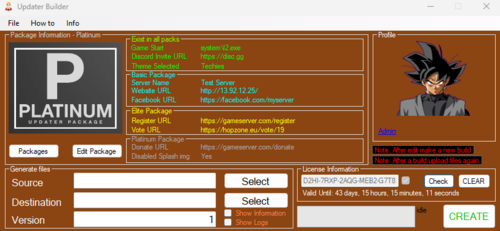
Version 1.2.155.15
3 downloads
Overview Auto Updater Builder is a VB.NET application designed to facilitate the creation of update packages. It generates individual ZIP files for each file in a source directory, maintaining the original directory structure, and creates version.txt, a filelist.txt and an index.php for version tracking, SHA256 hashes of the files, respectively and serving files to the client. Features Easy selection of source and output directories. Build Version number entry for tracking. Automated generation of version.txt, filelist.txt and index.php. ZIP file creation for each file in the source directory, preserving directory structure. SHA256 hash generation for file integrity verification. Manage Package info Installation The only thing you need to do is open Auto Updater Builder No specific installation process required. The application runs directly from the executable in the Windows environment. Usage Purchase a package that suits you best Set the serial key in the builder Manage the Package and set the settings (Game, Website, etc...) Select Source Folder: Click on the related Select button to choose the source directory containing the files for packaging. Select Output Folder: Click on the related Select button to define the destination directory for the generated packages. Version Input: Enter the version number in Version text box. This will be used in version.txt. Generate Packages: Press Generate to initiate the packaging process. Detailed Functionality Folder Checks: Ensures the selected source and output folders meet the necessary conditions (non-empty source, empty destination). Version Input Restriction: Only numeric inputs allowed for version number. File Processing: Processes files in the source directory recursively, computes SHA256 hashes, and packages them into ZIP files. Progress Tracking: Utilizes a progress bar to display progress. Error Handling: Provides user alerts for issues related to folder selection or file processing. File Handling and Deployment Generated Files Auto Updater Builder generates several files during its operation: version.txt: Contains the version number of the package. filelist.txt: Lists all files with their respective SHA256 hashes. data.json: Serves the client updater with the necessary information index.php: A fallback way for some hosts to serve the client updater the version.txt, filelist.txt, and data.json, acts as main page. Individual .zip files for each item in the source directory, preserving the directory structure. Moving Generated Files Once the packaging process is complete, the generated files are found in the specified output folder. These files include the version.txt, filelist.txt, index.php, data.json and a zips folder containing ZIP files for each item. To deploy these files for an update mechanism, follow these steps: Web Server Setup: Ensure you have a web server configured to serve files. In the provided code, the base URL is set as "http://127.0.0.1/updater/". Adjust this to your actual server's URL. Upload Files: Upload the version.txt and filelist.txt, index.php and data.json directly to the root of the designated path on your web server (e.g., http://yourserver.com/updater/). Upload the contents of the zips folder to a subdirectory on your web server, named zips (e.g., http://yourserver.com/updater/zips/). Client Application Configuration: The client application should be configured to check for updates from your web server. This is typically done by setting the baseURL in the application to match your web server's URL. Note Ensure that the web server's directory structure matches the expected paths set in the application code. For example, if your application expects version.txt at http://yourserver.com/updater/version.txt, it should be placed accordingly on the server. Auto Updater Builder - Automating package creation with ease and reliability.From 10.00 EUR -
Updated hopzone to latest version Note if you counter any error or broken template please report it
-
Greetings , interested in having your Lineage 2 server announced for advertising dissemination, through different social networks such as: Facebook, Instagram, VK, Tiktok and WhatsApp, we are at your service! At an affordable price Contact us and don't forget to follow us thanks FB_VID_3484465939167209967.mp4
-
Happy New Year!!!!
-
Hello, L2MaxPain Thank you for adding your server in Hopzone.eu! Some useful links [Hidden Content] here you can find: Your API Key Your Server Id Your Server status Banners Edit your server and more [Hidden Content] how to add a vote reward (for Developers) [Hidden Content] this system contains Hopzone.eu vote reward
-
Unlock VIP and premium banners this Black Friday with coupon code HOPZBF50. Enjoy exclusive discounts!
-
Τhere are untranslated parts on the website and some wrongly translated, if you see some of them please report them here. An ideal report would be like - Note: You can also add an image or the url where is this translation located Thank you all! For verified travel tips and real support, visit: [Hidden Content]
-
Banner prices rescaled, now all packages save the following 10 days (save 0€) 15 days (save 5€) 20 days (save 10€) 25 days (save 15€) 30 days (save 20€) 35 days (save 25€) 40 days (save 30€) Banner prices per 10 days starts from 7€ up to 35€
-
On this update optimized webserver for more speed. Also added Prefixes for forum using tags
-
Banner prices reduced to 5€ for 10 days with maximum price up to 32€ for 10 days prices reduced from -25€ per 10 days from -30% up to -70% on some occasions. More info visit the store [Hidden Content]
-
What is PII? PII, or personally identifiable information, refers to any data that can be used to identify, contact, or locate an individual member. When users sign up and visit your community, they may provide various types of PII, either voluntarily or as required by the platform's registration process. For example, an email address is required to complete the registration, and in some cases and IP address may be logged to authenticate a session, or to provide some context to the person posting content. You can visit your settings and Request to be forgotten Request your stored data Omit identifying info from 3rd party analytics URL: [Hidden Content]
-
Updated Languages for forum and website Romanian Français Polski
-
Recently some reported the votes for some servers to be already voted from another IP Address. A new update for the vote will check if your IP range is from cloudflare and will load your connecting IP Address. Added more security layers such as making multiple accounts and vote for the same server won't work. Minor security functionality for IP Spoofing Thanks for making your community better through reports
-
In this section all members can report abusing, spamming unethical or illegal activity in the community. The only thing you have to do is to make a topic with information and proof. A Moderator then will take all the necessary measurements. In this section you can report: Feedback abuse Scams To report someone, you have to: Respect GDPR Provide valid proofs as concern the scam Converastion (private message, skype messages, dates.) Paypal Transaction Proofs have to include member name Provide member's paypal email Use only the English language (if you don't know then you can use google translator) You are going to report a topic for: Spam Posts that need Moderator attention (like hiding useful posts) Flaming Rudeness, insulting posts, personal attacks or purposeless posts Offensive posts Posts or links to any sexually explicit, harmful, threatening, abusive, defamatory, obscene, hateful, racially or ethnically offensive Illegal Advertisements Delete Replies Then use the "Report" button.
-
Test Description
-
Missing/fixes can be posted in this topic Prelude PTS C0 - Prelude C1 - Harbingers of War C2 - Age of Splendor C2 - Age of Splendor - Update 1 C3 - Rise of Darkness C3 - Rise of Darkness - Update 1 C3 - Rise of Darkness - Update 2 C3 - Rise of Darkness - Update 3 C4 - Scions of Destiny C4 - Scions of Destiny - Update 1 C5 - Oath of Blood C5 - Oath of Blood - Update 1 C5 - Oath of Blood - Update 2 Chaotic Throne - Interlude Chaotic Throne - Interlude - Update 1 Chaotic Throne - Interlude - Update 2 Chaotic Throne - Interlude - Update 3 Chaotic Throne - 1.5 Hellbound Chaotic Throne - 2.1 Gracia Update 1 Chaotic Throne - 2.2 Gracia Update 2 Chaotic Throne - 2.3 Gracia Gracia Final Chaotic Throne - 2.4 Gracia Epilogue Chaotic Throne - 2.4 Gracia Epilogue - Update 1 Chaotic Throne - 2.5 Freya Chaotic Throne - 2.6 High Five Chaotic Throne - 2.6 High Five - Update 1 Chaotic Throne - 2.6 High Five - Update 2 Chaotic Throne - 2.6 High Five - Update 3 Chaotic Throne - 2.6 High Five - Update 4 Chaotic Throne - 2.6 High Five - Update 5 Goddess of Destruction - 1 Awakening Goddess of Destruction - 1.5 Harmony Goddess of Destruction - 2 Tauti Goddess of Destruction - 2.5 Glory Days Goddess of Destruction - 3 Lindvior Goddess of Destruction - 3.5 Valiance/Epeisodion/Raiders Epic Tale of Aden 1.0 - Ertheia Dimensional Strangers Epic Tale of Aden 2.0 - Infinite Odyssey Shadows of Light Epic Tale of Aden 2.5 - Underground Hymn of the Soul Epic Tale of Aden 3.0 - Helios Lord of Bifrost Epic Tale of Aden 3.1 - Helios Arena (MOBA) Epic Tale of Aden 4.0 - Grand Crusade Epic Tale of Aden 5.0 - Salvation Arena Beta Epic Tale of Aden 5.0 - Salvation The Gathering/Orfen Epic Tale of Aden 5.5 - Salvation Etina's Fate Epic Tale of Aden 6.0 - Fafurion - Update 1 Epic Tale of Aden 6.1 - Fafurion - Update 2 Epic Tale of Aden 7.1 - Prelude of War - Update 1 Epic Tale of Aden 7.2 - Prelude of War - Update 2 Epic Tale of Aden 7.3 - Prelude of War - Update 3 Epic Tale of Aden 8.1 - Homunkulus 1 Dawn of Heroes Epic Tale of Aden 8.2 - Homunkulus 2 Tales Untold Epic Tale of Aden 9.1 - Return of the Queen Ant - Wild Horizons Epic Tale of Aden 9.2 - Return of the Queen Ant - Herald of Light Epic Tale of Aden 10.1 - Battle Chronicles - Master Class Epic Tale of Aden 10.2 - Battle Chronicles - Vanguard Epic Tale of Aden 10.3 - Battle Chronicles - Hore's Tome Epic Tale of Aden 11.0 - Immortal Weapon Epic Tale of Aden 12.0 - Chosen by Darkness Epic Tale of Aden 1.0 - Classic 0.5 - Beta Epic Tale of Aden 2.0 - Classic 1.0 - Release Epic Tale of Aden 2.0 - Classic 1.3 - Tower of Insolence Epic Tale of Aden 2.5 - Classic 1.5 - Age of Splendor Epic Tale of Aden 3.0 - Classic 2.0 - Saviors Epic Tale of Aden 4.0 - Classic 2.5 - Saviors Zaken Forgotten Island Epic Tale of Aden 5.0 - Classic 2.7 - Saviors Antharas Epic Tale of Aden 5.5 - Classic 2.8 - The Seven Signs Epic Tale of Aden 6.0 - Classic 2.9 - Secret of the Empire Update 1 Epic Tale of Aden 6.1 - Classic 2.9.5 - Secret of the Empire Update 2 Epic Tale of Aden 6.2 - Classic 3.0 - The Shadow of the Kamael Update 1 Epic Tale of Aden 6.2 - Classic 3.5 - Kamael Update 2 Epic Tale of Aden 6.2 - Classic 3.7 - Kamael Update 3 Winter of War Epic Tale of Aden 6.3 - Classic 3.8 - Kamael Update 4 Dawn of Heroes Epic Tale of Aden 6.4 - Classic 3.9 - Kamael Update 5 Tales Untold Epic Tale of Aden 6.2 - Essence 1.0 - Release Epic Tale of Aden 6.2 - Essence 2.0 - Kamael Epic Tale of Aden 6.2 - Essence 2.0 - Kamael Update 2 Epic Tale of Aden 6.2 - Essence 3.0 - Death Knight Epic Tale of Aden 6.3 - Essence 3.5 - Fluffy Reinforcement Epic Tale of Aden 6.4 - Essence 3.7 - Dwelling of Spirits Epic Tale of Aden 9.1 - Essence 4.0 - Sylph Wild Horizons Epic Tale of Aden 9.2 - Essence 5.2 - Frost Lord Herald of Light Epic Tale of Aden 10.1 - Essence 6.2 - Battle Chronicles Vanguard Epic Tale of Aden 10.2 - Essence 6.2 - Battle Chronicles Crusader More info: [Hidden Content]